TikTok Shop KYC Requirements: What Every Seller Needs to Know
Quick Answer:
To complete TikTok Shop KYC, log in to Seller Center with your Primary or Main Administrator account, click your profile icon (top right), select My Account → Account Settings → Qualification Center → Seller Qualification. You'll need business registration documents, personal ID, proof of address, and a bank account in your business name. Documents must match exactly across all records.
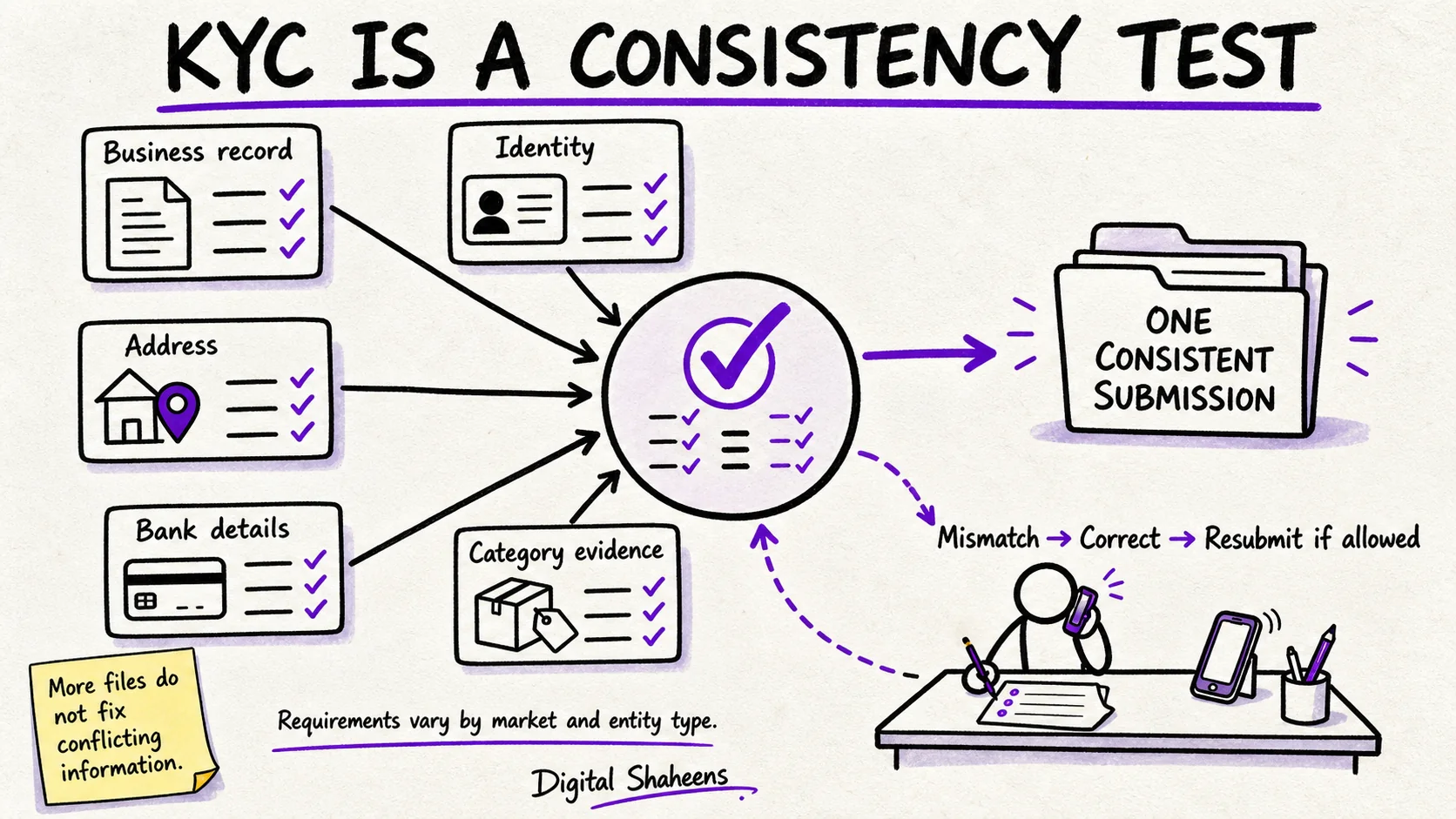
TikTok Shop identity and business verification is a consistency test: the information submitted for the person, entity, address, bank account, ownership, and category must form one coherent record. More files do not fix conflicting information.
This guide explains how to prepare and review a submission. Requirements vary by market, seller type, and category; TikTok controls approval and can request additional evidence.
Where to Complete TikTok Shop KYC Verification
Based on official TikTok Shop documentation, sellers complete KYC verification by:
- Logging in to TikTok Shop Seller Center with the Primary or Main Administrator account
- Clicking the shop profile icon in the top right corner
- Selecting My Account, then clicking Account Settings
- Navigating to Qualification Center
- Selecting Seller Qualification to view and complete verification requirements
During initial registration, verification appears on the Review Application page. Fix any yellow warning symbols and upload requested documents before submitting. Source: TikTok Shop Seller Center Help.
What is TikTok Shop KYC?
KYC (Know Your Customer) is the process TikTok uses to verify the identity of every business selling on its platform. Before your shop can list products or receive payouts, TikTok needs to confirm:
- You are a real, legally registered business
- The person operating the account is who they say they are
- Your business bank account matches your registered business name
- You are not operating in a prohibited category without appropriate licences
Use the current onboarding checklist in Seller Center as the source of truth. Do not assume a document accepted in another market, account, or earlier application will satisfy the current review.
Required Documents by Market
The examples below are preparation prompts, not a definitive eligibility checklist. Confirm the documents requested in the official onboarding flow for the selected market, seller type, and category.
USA preparation examples
- EIN (Employer Identification Number) or SSN for sole traders
- Business registration certificate (Articles of Incorporation or LLC Operating Agreement)
- Government-issued personal ID (passport or driver's licence)
- US bank account in the business name
- Business address proof (utility bill or lease agreement)
UK preparation examples
- Companies House registration number
- Certificate of Incorporation
- Personal ID of the director
- UK business bank account
- VAT number if your turnover exceeds the VAT threshold
Australia preparation examples
- ABN (Australian Business Number)
- Business registration document
- Personal ID of the account holder
- Australian business bank account
The Most Common KYC Rejection Reasons
Review these common consistency and document-quality risks before submission, then compare them with the specific requirements and any notice shown in Seller Center:
1. Name Mismatch
If the business record and bank or address evidence use different names or entity details, the submission may need explanation or correction. Enter the legal details exactly as required and use the official process for supported variations.
2. Expired Documents
Check validity dates and current status before submission. Expired or inactive evidence may not satisfy the review requirements.
3. Unreadable Scans
Low-resolution, glared, obstructed, or cropped images can prevent verification. Follow the upload instructions and make required fields and document boundaries clear without digitally altering the evidence.
4. Restricted Product Categories
Some products or categories may require additional licences, testing, declarations, or approvals. Check the current category rules for the target market before listing or submitting supporting evidence.
5. Account or Access Inconsistency
Unexpected changes in account, device, location, ownership, or access patterns may lead to additional checks. Use authorized access, accurate operating information, and TikTok's official support route if legitimate circumstances need explanation.
Shop Health: Staying Compliant After Launch
Verification and compliance obligations can continue after launch. Monitor the account-health and policy information available in Seller Center, which may include:
- Policy violations (listing prohibited items, misleading product descriptions)
- Customer service metrics (response time, dispute resolution rate)
- Fulfilment performance (on-time dispatch rate, tracking upload rate)
- Returns and refund rates
Account-health and enforcement consequences depend on the metric, notice, market, and policy. Monitor Seller Center and correct issues promptly rather than inferring a guaranteed distribution or suspension outcome.
Our KYC & Compliance service can review readiness, organize evidence, monitor notices within the agreed scope, and support correction or appeal preparation. TikTok controls decisions and response times.
What to Do If Your Shop Gets Suspended
A suspension is not necessarily permanent. Here is the process:
- Identify the specific policy violation cited in the suspension notice
- Remove or correct the offending listing, content, or practice
- Submit an appeal through TikTok Seller Centre with evidence of compliance
- Use only escalation or support routes legitimately available to the account
Response times vary. Track the case in Seller Center, respond only through authorized channels, preserve submitted evidence, and avoid duplicate or contradictory submissions unless TikTok requests them.
Frequently Asked Questions
Where do I complete TikTok Shop KYC verification?
Log in to TikTok Shop Seller Center, click your shop profile icon in the top right, select My Account, then click Account Settings. Navigate to Qualification Center, then Seller Qualification. You must use the Primary or Main Administrator account to complete verification.
What documents are required for TikTok Shop KYC?
Requirements vary by market and business type. US sellers typically need EIN or SSN, business registration documents, government-issued personal ID, US bank account in the business name, and proof of business address. Check Seller Center for your specific requirements.
Why does TikTok Shop reject KYC applications?
Common rejection reasons include name mismatches between documents, expired or unreadable documents, inconsistent information across business and personal records, restricted product categories without proper licensing, or missing required documentation.
How long does TikTok Shop KYC verification take?
Review times vary by market, seller type, category, and document quality. TikTok may request additional information during the process. Check Seller Center for your verification status; no approval timeline is guaranteed.
Sources
- TikTok Shop: INFORM Consumers Act Seller Requirements - Official Seller Center guidance on verification location and Qualification Center
- TikTok Shop: How to register as an Individual - Official documentation requirements and Review Application process
- TikTok Shop: Registering for TikTok Shop - Official seller registration and verification steps
Related service
TikTok Shop KYC and compliance serviceFix verification, policy, suspension and Shop Health issues before they block growth.
Want this done for you?
Get help with your TikTok Shop operations. Book a free strategy call.
Book a Free Strategy Call →Related TikTok Shop resources
- TikTok Shop Account Health Problems: Fix Warnings Fast
- TikTok Shop Account Suspended — How to Appeal in 2026
- Recover a Suspended TikTok Shop Account
- TikTok Shop Commissions Frozen — 7 Fixes
- TikTok Shop KYC Failed? How to Fix Verification in 2026
- TikTok Shop KYC Rejected? How to Fix It (US Sellers)
- TikTok Shop KYC for US Businesses: LLC, EIN and Owner ID Checklist
- TikTok Shop Risky Behavior Suspension: Appeal Guide